
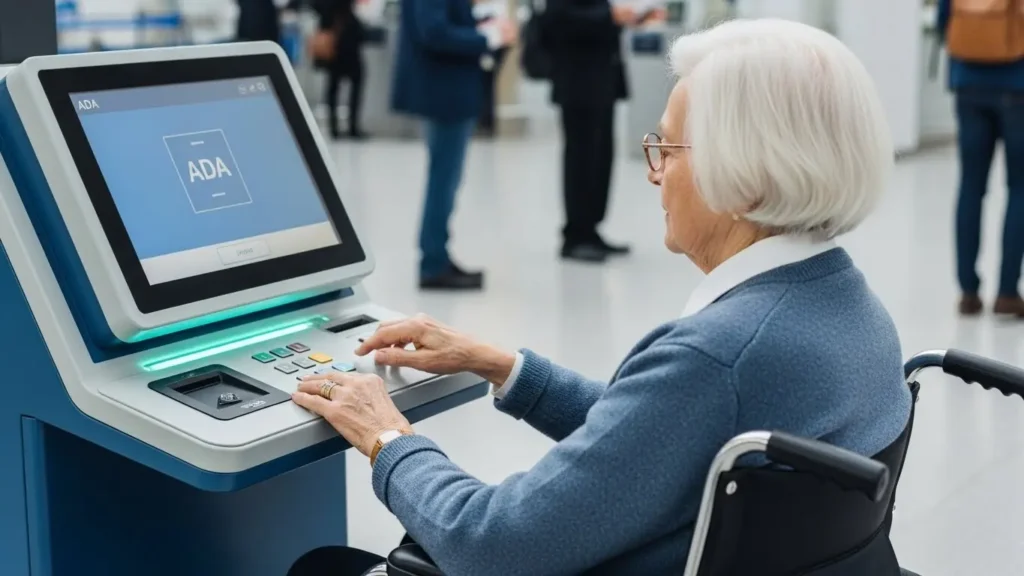
Introduction: Making Public Services Truly Accessible
Public service should be equal, convenient, and easy to access for everyone — including individuals with disabilities, senior citizens, and people with temporary mobility challenges. Yet in many countries, citizens still struggle with long queues, complicated paperwork, and government offices that are not fully accessible.
This is where ADA-compliant government self-service kiosks make a real difference.
These kiosks are not just machines — they are a bridge that connects citizens with government services in a more inclusive and efficient way.
In this article, we will explore:
-
Why ADA compliance matters for government kiosks
-
What accessibility features modern kiosks should include
-
How kiosks improve equality and efficiency in public service
-
Best use cases and deployment scenarios
-
How to choose the right accessible kiosk for government agencies
If your government institution or kiosk brand is planning to upgrade its service infrastructure, this guide gives you everything you need to know.
What Does ADA Compliance Mean for Government Kiosks?
Le Americans with Disabilities Act (ADA) sets clear standards ensuring that public interfaces — including digital kiosks — are accessible to people with disabilities.
For kiosks, this means:
1. The interface must be usable by wheelchair users
-
Correct screen height
-
Reachable buttons
-
Enough floor space for wheelchair turning
2. The kiosk must support visually impaired users
-
Screen readers
-
Claviers tactiles
-
High-contrast UI
-
Braille labels
3. Audio accessibility for people with hearing or vision challenges
-
Headphone jacks
-
Adjustable audio levels
-
On-screen captions
4. Clear physical guidance
-
Lighting
-
Icons
-
Step-by-step instructions
For governments, ADA compliance is not only a legal responsibility — it is a crucial step toward creating fair and inclusive public services.
Why Accessibility Matters in Public Service
Government offices serve everyone, including:
-
Senior citizens
-
Veterans
-
People with limited mobility
-
Citizens with visual impairments
-
People with temporary injuries
-
Individuals with cognitive challenges
Many of these groups struggle with:
-
Long waiting times
-
Complex paperwork
-
Hard-to-understand procedures
-
Physical barriers inside government buildings
An ADA-compliant kiosk can reduce these barriers dramatically by providing:
-
A simple step-by-step interface
-
Automated form processing
-
Instant instructions
-
Multilingual support
-
Quick payments or applications
This leads to greater satisfaction, shorter queues, and higher service efficiency.
Key Accessibility Features in ADA-Compliant Government Kiosks
Modern government kiosks are designed with “inclusive-first” thinking. Here are the essential features:
1. Screen Height & Reach Ranges
ADA standards require:
-
Touchscreen height: max 1220 mm (48 inches)
-
Reachable interface controls: 380–1220 mm (15–48 inches)
-
Clear floor space for wheelchair access
This ensures wheelchair users can operate the kiosk comfortably.
2. Tactile Keypad & Braille Support
For visually impaired citizens:
-
Braille-labeled keys
-
Raised, tactile keypads
-
Embossed navigation buttons
These help users navigate menus even without full eyesight.
3. Audio Guidance & Headphone Jack
For people with partial or full visual impairment:
-
Headphone port
-
Voice-guided navigation
-
Adjustable volume
-
Text-to-speech (TTS) assistance
Audio guidance makes complex procedures feel simple.
4. High-Contrast, Large-Text Interface
A good ADA kiosk UI should include:
-
Large text
-
Bold icons
-
Clear color contrast
-
Simple menu flow
This helps seniors and users with low vision.
5. Multilingual Accessibility
Governments often serve multicultural communities.
Kiosks can provide:
-
English
-
Spanish
-
Arabic
-
Chinese
-
French
-
Local languages
A language selector improves usability for immigrants and tourists.
6. Easy-Access Hardware
Accessible kiosks may include:
-
Lower-positioned barcode scanners
-
Angled RFID card readers
-
Wide-mouth document slots
-
Easy-reach ID/passport readers
These eliminate the need to stretch or bend.
7. User-Friendly Workflow
Accessibility is not only hardware — it’s also workflow design:
-
Clear instructions
-
Animated guidance
-
1–2 actions per screen
-
Error recovery prompts
This ensures smooth operation even for first-time users.
How ADA-Compliant Kiosks Improve Public Service Accessibility
1. Equal Access for All Citizens
Government services become reachable for:
-
Wheelchair users
-
People with vision difficulties
-
People with hearing challenges
-
Elderly citizens
This directly improves fairness and equality in public services.
2. Reduced Waiting Lines in Government Offices
Kiosks help citizens complete:
-
Paiements de factures
-
ID verification
-
Certificate printing
-
Queue registration
-
Application submissions
This reduces bottlenecks at service counters.
3. Accurate and Faster Service
Kiosks eliminate manual errors caused by:
-
Handwritten forms
-
Manual data entry
-
Miscommunication
Digital forms significantly speed up government workflow.
4. Lower Operational Costs
Fewer staff are needed for repetitive tasks.
Government departments can save on:
-
Labor costs
-
Paper and printing
-
Manual processing time
This makes kiosks a cost-effective digital transformation tool.
5. 24/7 Availability for Public Convenience
Kiosks can be installed in:
-
Government buildings
-
Shopping malls
-
Community centers
-
Transportation hubs
-
Outdoor public spaces
Citizens can access services anytime without waiting for office hours.
Real Use Cases of ADA-Compliant Government Kiosks
1. Tax & Bill Payment Kiosks
Allow citizens to pay taxes, utilities, fines, and fees with ease.
2. Identity Verification & Document Services
-
ID card renewal
-
Passport photo & scanning
-
Resident permit applications
3. Public Health Service Kiosks
-
Appointment check-in
-
Hospital registration
-
Insurance verification
4. Judicial & Administrative Kiosks
-
Court fine payments
-
Form submissions
-
Document printing
5. Outdoor Smart City Information Kiosks
Provide 24/7 public information and emergency assistance.
How to Choose the Right ADA-Compliant Government Kiosk
1. Check ADA-certified accessibility dimensions
Ensure the kiosk meets all reach range and height requirements.
2. Look for multimodal accessibility (audio + tactile + visual)
One accessibility feature is not enough — full support is needed.
3. Choose industrial-grade hardware
Government kiosks must work 24/7 with minimal maintenance.
4. Ensure strong data security
Especially important for ID-related and payment-related services.
5. Customize workflow based on government processes
Your vendor should support custom UI + system integration.
6. Outdoor kiosks must be weatherproof and vandal-proof
If used outdoors, the kiosk must handle:
-
Sunlight
-
Rain
-
Dust
-
Extreme temperatures
-
High traffic environments
Conclusion: Accessibility Is the Future of Digital Government
ADA-compliant government kiosks represent a major step forward in building a truly inclusive public service environment. They reduce service barriers, improve citizen satisfaction, and help government agencies operate more efficiently.
Whether used in city halls, hospitals, libraries, courts, or community centers, accessible kiosks make government services smarter, faster, and more human-centered.
For government institutions seeking digital transformation, investing in ADA-compliant kiosks is not only beneficial — it is essential.
 English
  Spanish
  French
  German
  Portuguese
  Italian
  Russian
  Dutch
Dutch  Norwegian
  Arabic

